Scheduled Jobs
A scheduled job runs an action on a schedule you define — once, on a repeating interval, or on a cron expression. Jobs can push a deployment, run a command, collect inventory, scan for Windows updates, or run a server-side maintenance task such as a database backup. Manage jobs from the console, the REST API, or the PowerShell module.
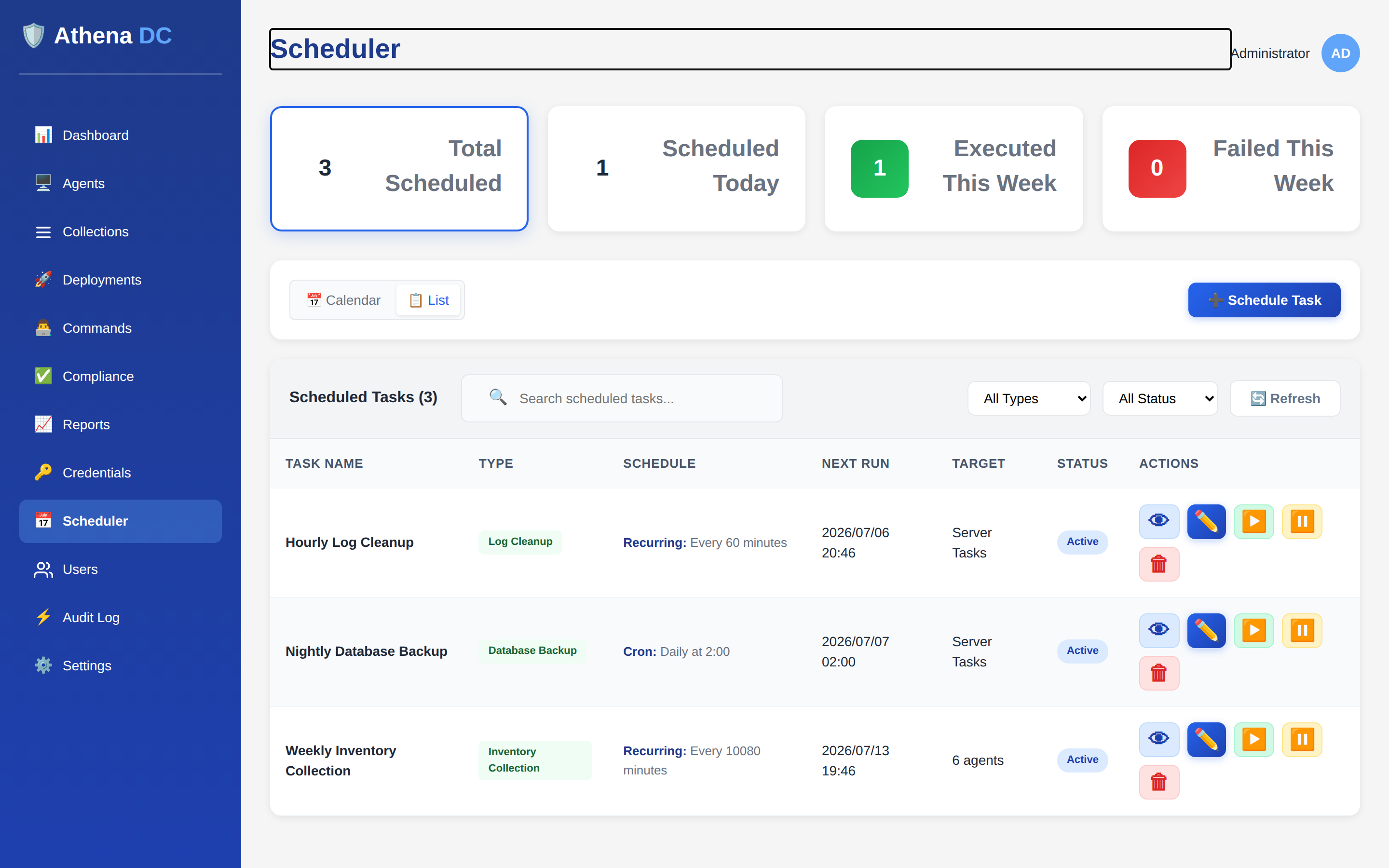
How scheduling works#
Every scheduled job combines a schedule type (when it runs) with an action type (what it does). The server owns the timing, so jobs keep running on schedule independently of any console session — there is nothing to install on a workstation. Agent tasks (deployments, commands, inventory, update scans) run against the agents you target; server tasks (backups, cleanups, collection refresh) run on the Athena server itself and need no targets.
Managing scheduled jobs requires the Operator or Admin role; deleting a job requires Admin. See Roles & Permissions.
Schedule types#
| Schedule type | Runs… | Required field |
|---|---|---|
OneTime | Once, at a specific date and time. | scheduledTime (must be in the future) |
Recurring | Every fixed interval. | intervalMinutes (a positive number) |
Cron | On a cron expression — for fixed clock times such as "daily at 02:00" or "every Sunday at 03:00". | cronExpression |
A OneTime job moves to the Completed status after it runs. A
Recurring or Cron job keeps running until you pause or delete it.
Cron expressions#
Athena accepts the standard 5-field cron format
(minute hour day-of-month month day-of-week). You can also supply a native
6- or 7-field expression if you need second-level precision. Some common patterns:
| Expression | Meaning |
|---|---|
0 0 * * * | Daily at midnight. |
0 2 * * * | Daily at 02:00. |
0 3 * * 0 | Every Sunday at 03:00. |
*/15 * * * * | Every 15 minutes. |
You can validate an expression before saving and get a human-readable description of it with
GET api/scheduler/validate-cron?expression=…. The server returns whether the
expression is valid, a plain-English description, and an error message when it is not.
When you specify a particular day-of-month and a particular day-of-week in the
same 5-field expression, Athena keeps the day-of-month and treats day-of-week as
unrestricted. To schedule by weekday, leave day-of-month as * (for example
0 3 * * 0 for Sundays).
Action types#
Agent tasks act on endpoints and require at least one target — supplied as
agent IDs (targetAgentIds) and/or tags
(targetTags):
| Action type | What it does | Also requires |
|---|---|---|
Deployment | Runs a deployment against the targets. | deploymentId |
Command | Runs a command on the targets. | command (plus optional commandArguments) |
InventoryCollection | Collects inventory from the targets. | — |
WindowsUpdateScan | Scans the targets for missing Windows updates using the WSUS offline catalog. | — |
Server tasks run on the Athena server and take no targets. They are intended for routine maintenance:
| Action type | What it does |
|---|---|
DatabaseBackup | Backs up the Athena database. See Database Backup & Maintenance. |
LogCleanup | Cleans up and rotates logs. |
AgentsCleanup | Cleans up inactive agents. |
CollectionRefresh | Recomputes members of dynamic collections. |
CommandsCleanup | Cleans up old commands and their results. |
RustDeskPasswordRotation | Rotates remote-desktop passwords that are due. |
Job status & lifecycle#
A scheduled job is always in one of four states, and the actions you can take depend on it:
| Status | Meaning | Allowed actions |
|---|---|---|
Active | Will run on its schedule. | Update, pause, trigger now, delete. |
Paused | Held; will not run until resumed. | Update, resume, trigger now, delete. |
Disabled | Turned off. | Delete. |
Completed | A one-time job that has already run. | Delete. |
Pause applies only to an Active job; resume
applies only to a Paused job; update and
trigger now apply to Active or Paused jobs.
Triggering a job runs it immediately without affecting its regular schedule. Each job tracks
its next and last run time, run counts, and the last result so you can see at a glance
whether it is healthy.
Creating a job via the API#
Post a job definition to POST api/scheduler/jobs. A cron-based deployment that
runs daily at midnight against a tag:
POST /api/scheduler/jobs
{
  "name": "Nightly app rollout",
  "description": "Push the line-of-business app every night",
  "scheduleType": "Cron",
  "actionType": "Deployment",
  "cronExpression": "0 0 * * *",
  "deploymentId": "550e8400-e29b-41d4-a716-446655440000",
  "targetTags": ["workstations"]
}
A one-time command at a fixed maintenance window:
POST /api/scheduler/jobs
{
  "name": "Patch-window restart",
  "scheduleType": "OneTime",
  "actionType": "Command",
  "scheduledTime": "2026-01-15T02:00:00",
  "command": "shutdown /r /t 60",
  "targetTags": ["windows-servers"]
}
A server task — a weekly database backup — needs no targets:
POST /api/scheduler/jobs
{
  "name": "Weekly DB backup",
  "scheduleType": "Cron",
  "actionType": "DatabaseBackup",
  "cronExpression": "0 3 * * 0"
}
Scheduler endpoints#
| Method & path | Purpose |
|---|---|
GET api/scheduler/jobs | List jobs (paginated; filter by status, type, search). |
GET api/scheduler/jobs/{id} | Get a single job. |
POST api/scheduler/jobs | Create a job. |
PUT api/scheduler/jobs/{id} | Update an Active or Paused job. |
DELETE api/scheduler/jobs/{id} | Delete a job (Admin only). |
POST api/scheduler/jobs/{id}/pause | Pause an Active job. |
POST api/scheduler/jobs/{id}/resume | Resume a Paused job. |
POST api/scheduler/jobs/{id}/trigger | Run the job now (does not change its schedule). |
GET api/scheduler/jobs/{id}/history | Execution history (default 10 records; set count). |
GET api/scheduler/stats | Job counts for the dashboard. |
GET api/scheduler/today | Jobs whose next run is today. |
GET api/scheduler/validate-cron | Validate and describe a cron expression. |
All scheduler endpoints require authentication; see the API Reference.
PowerShell#
The Athena PowerShell module manages scheduled jobs end to end:
# Create a recurring inventory collection every hour for two agents
New-AthenaScheduledJob -Name "Hourly inventory" -ScheduleType Recurring `
    -ActionType InventoryCollection -IntervalMinutes 60 `
    -TargetAgentIds @($agent1Id, $agent2Id)

# Create a daily deployment via cron, targeting a tag
New-AthenaScheduledJob -Name "Daily rollout" -ScheduleType Cron `
    -ActionType Deployment -CronExpression "0 0 * * *" `
    -DeploymentId $deploymentId -TargetTags @("workstations")

# Create a weekly server-side database backup (no targets needed)
New-AthenaScheduledJob -Name "Weekly DB backup" -ScheduleType Cron `
    -ActionType DatabaseBackup -CronExpression "0 3 * * 0"
Listing, filtering, and managing existing jobs:
# List jobs, with optional filters
Get-AthenaScheduledJob
Get-AthenaScheduledJob -Status Active
Get-AthenaScheduledJob -ActionType Deployment
Get-AthenaScheduledJob -Search "backup"

# Update, pause, resume, run now, and view history
Set-AthenaScheduledJob -Id $jobId -CronExpression "0 2 * * *"
Suspend-AthenaScheduledJob -Id $jobId   # pause
Resume-AthenaScheduledJob -Id $jobId
Start-AthenaScheduledJob -Id $jobId    # trigger now
Get-AthenaScheduledJobHistory -Id $jobId -Count 20

# Dashboard counts, and remove a job (Admin)
Get-AthenaSchedulerStats
Remove-AthenaScheduledJob -Id $jobIdSuspend-AthenaScheduledJob pauses a job, Resume-AthenaScheduledJob
resumes it, and Start-AthenaScheduledJob triggers an immediate run — the same
operations as the /pause, /resume and /trigger
endpoints above.