Compliance & Baselines
Athena's Compliance Engine lets you define what "compliant" means for your fleet as rules, group those rules into baselines, and assign a baseline to a collection of machines. Each agent evaluates its assigned rules on a schedule and reports a per-rule state back to the server — with optional automatic remediation when a rule both supports it and is configured for it.
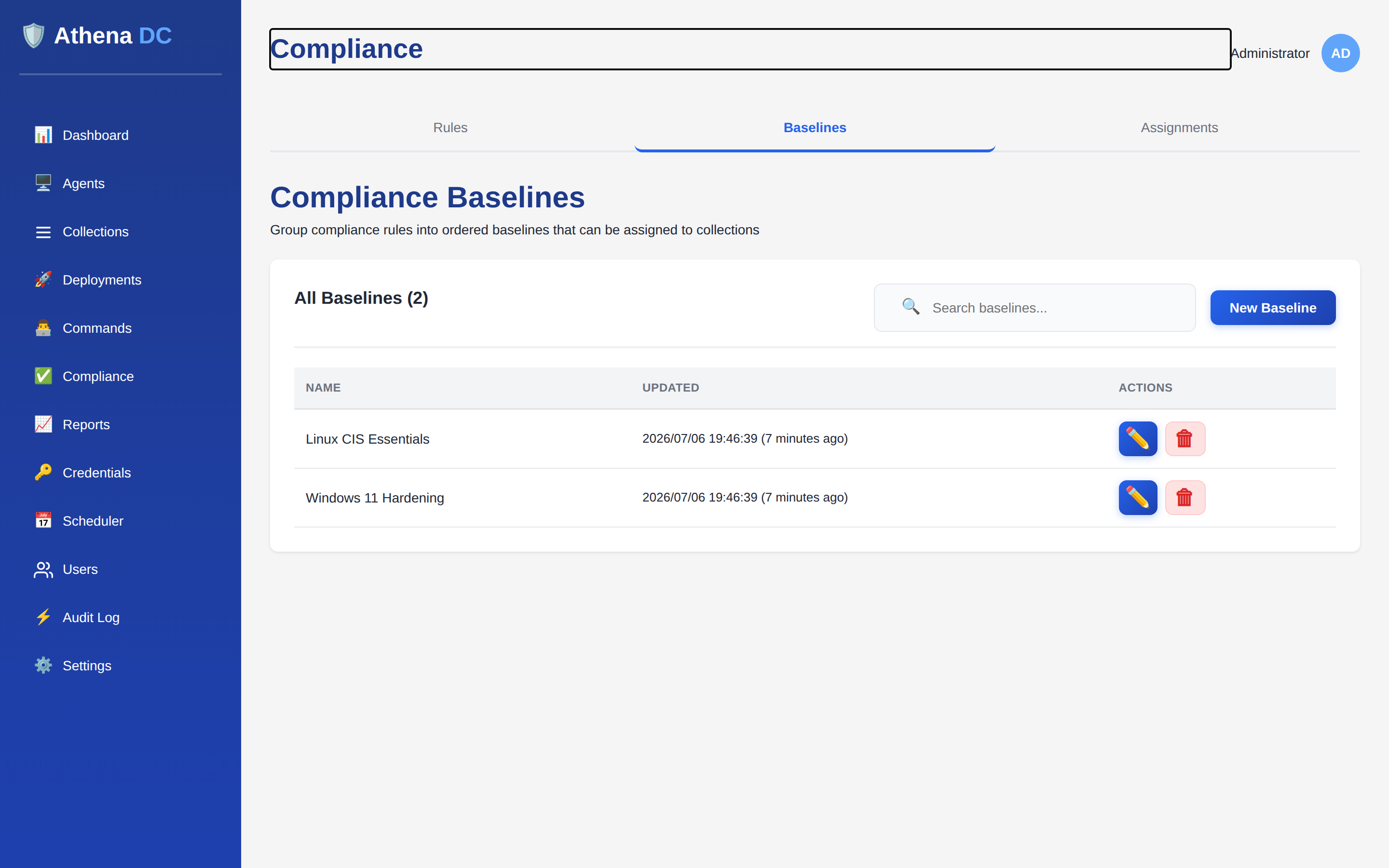
The model: rules, baselines, assignments#
The engine is built from three entities. You author them top-down (rules first), but they take effect bottom-up (an assignment is what actually sends a baseline's rules to agents):
| Entity | What it is | Endpoint |
|---|---|---|
| Compliance rule | A single check: a PowerShell detection script and an optional remediation script, with a target platform. | api/compliance/rules |
| Baseline | An ordered group of rules — the unit you assign to machines. | api/compliance/baselines |
| Baseline assignment | Links one baseline to one collection, with an evaluation interval. | api/compliance/assignments |
All compliance endpoints live under api/compliance and require authentication.
See Roles & permissions for who can do what, and the
API Reference for the wider API.
Compliance rules#
A rule is a single check expressed as PowerShell. The detection script
decides whether the machine is compliant; the agent treats the result strictly — a rule is
Compliant only when the script returns a boolean $true. Any other
result ($false, $null, no output, or the wrong type) is
NonCompliant, and a script that throws or times out is Error.
A rule has these fields:
| Field | Description |
|---|---|
name | Required. Display name; must be unique (a duplicate name returns 409 Conflict). |
description | Optional free-text description of what the rule checks. |
platform | Target platform — see platforms. Windows is the value wired today. |
detectionScript | Required. PowerShell that returns $true for compliant. Evaluated strictly. |
remediationScript | Optional PowerShell that brings a non-compliant machine into line. Only used when autoRemediate is on. |
autoRemediate | When true, the agent runs the remediation script on a non-compliant result — see auto-remediation. |
timeoutSeconds | Maximum run time per script invocation. Must be greater than zero. Defaults to 120 seconds. |
Create a rule with a JSON body, for example a BitLocker check:
# POST api/compliance/rules  (Admin role)
{
  "name": "BitLocker enabled on C:",
  "description": "Ensures the OS volume is BitLocker-protected",
  "platform": 0,
  "detectionScript": "(Get-BitLockerVolume -MountPoint C:).ProtectionStatus -eq 'On'",
  "remediationScript": null,
  "autoRemediate": false,
  "timeoutSeconds": 120
}On create and on any change to the detection or remediation script, the server stamps a
SHA-256 bodyHash over the rule body. When an agent reports a result it includes
the hash of the script it actually ran, so the console can tell you when a machine evaluated
an old version of a rule — drift you would otherwise have to guess at.
Platforms#
Each rule targets a platform. A rule whose platform does not match an agent's operating system is reported as NotApplicable rather than run — for example, a Linux rule on a Windows agent.
| Value | Name | Meaning |
|---|---|---|
0 | Windows | Windows agents. This is the platform evaluated today. |
1 | Linux | Reserved for Linux agents; the Windows agent reports these as NotApplicable. |
2 | Any | Cross-platform rule intended to run on every supported OS. |
Baselines#
A baseline is an ordered group of rules — the unit you assign to machines. You build it by listing rule IDs; the order of the list is preserved as the rules' sort order within the baseline. An empty baseline (no rules yet) is valid.
# POST api/compliance/baselines  (Operator or Admin)
{
  "name": "Windows 11 Hardening",
  "description": "Baseline rules for Windows 11 hardening",
  "ruleIds": [
    "550e8400-e29b-41d4-a716-446655440000",
    "550e8400-e29b-41d4-a716-446655440001"
  ]
}
Reading a single baseline (GET api/compliance/baselines/{id}) returns the
baseline together with its ordered rules in one response, so the console fetches everything
it needs in a single round-trip.
When you update a baseline and include ruleIds, the baseline's complete rule
membership is replaced atomically with the list you send. Omit ruleIds to leave
membership untouched and change only the name or description. A rule that is still a member
of any baseline cannot be deleted — remove it from every baseline first.
Assignments#
An assignment is what puts a baseline to work: it links one baseline to one collection and sets how often the agents in that collection re-evaluate it. A baseline can be assigned to a given collection at most once.
| Field | Description |
|---|---|
baselineId | The baseline to deploy. Must reference an existing baseline. |
collectionId | The collection of machines to deploy it to. Must reference an existing collection. |
evaluationIntervalMinutes | How often each agent re-evaluates the baseline against itself. Must be greater than zero. Defaults to 60. |
maxConcurrentRemediations | Optional cap on concurrent remediation runs for this assignment. When set it must be greater than zero; null means unlimited. |
# POST api/compliance/assignments  (Operator or Admin)
{
  "baselineId": "550e8400-e29b-41d4-a716-446655440000",
  "collectionId": "550e8400-e29b-41d4-a716-446655440001",
  "evaluationIntervalMinutes": 60,
  "maxConcurrentRemediations": null
}
You can list all assignments, or fetch just the assignments for one collection with
GET api/compliance/assignments/by-collection/{collectionId}. To re-target an
assignment to a different baseline or collection, delete it and create a new one — the
baseline and collection of an existing assignment are not editable in place.
How evaluation works#
When a baseline is assigned to a collection, its rules are sent to the agents in that
collection, which evaluate them immediately and then again on the assignment's
evaluationIntervalMinutes cadence. For the full picture of when rules are
pushed and re-run — including agents that join a collection later, forcing a re-check with
Evaluate Now, and how offline machines catch up — see
Compliance Evaluation Lifecycle. For each rule the
Windows agent:
- Skips the rule as NotApplicable if its platform does not match the agent's OS.
- Runs the detection script (bounded by
timeoutSeconds) and maps the result to Compliant, NonCompliant, or Error. - If the result is NonCompliant and the rule has
autoRemediateon with a remediation script, runs remediation and re-checks. - Reports the final state back to the server, stamped with the rule body hash it actually ran.
Evaluations run one at a time on the agent — PowerShell is heavyweight and the agent may also be running commands, scans and deployments, so compliance is deliberately kept non-disruptive rather than parallelised. If an agent cannot reach the server to report, the results are queued locally and delivered on the next successful connection, so an offline or briefly disconnected machine never silently loses its evaluation.
Compliance states#
Each (agent, rule) pair has a single latest state:
| State | Meaning |
|---|---|
Compliant | The detection script returned boolean $true. |
NonCompliant | The detection script returned anything other than $true (false, null, no output, or wrong type). |
Error | The detection script threw, timed out, or could not be executed. |
NotApplicable | The rule's platform does not match the agent's OS, so it was not run. |
Remediated | The machine was non-compliant, auto-remediation ran successfully, and a follow-up detection confirmed compliance. This is a transient state until the next evaluation re-confirms Compliant. |
Alongside the state, each result carries the timestamp it was evaluated, the captured PowerShell output streams (and, on an error, a top-line error message for quick display), and — for remediated machines — when remediation last occurred.
Auto-remediation#
Auto-remediation only happens when all three conditions hold: the detection result
is NonCompliant, the rule's autoRemediate flag is on, and the rule has a
remediation script. When they do, the agent runs the remediation script and then
re-runs detection to confirm it worked:
- If remediation succeeds and the follow-up detection is now compliant, the state becomes Remediated and the remediation time is recorded.
- If remediation runs but the machine is still non-compliant, the state stays NonCompliant.
- If the remediation script itself errors, the state becomes Error.
Enabling autoRemediate on a rule means Athena will run a script that
changes machines without a human in the loop, so it is restricted to the Admin
role. Every flip of the flag — including setting it on at create time — emits a Critical
audit event in addition to the standard rule-change record, giving your
SIEM a clear signal whenever unattended remediation is switched
on. Test remediation scripts carefully before enabling the flag fleet-wide.
Roles & permissions#
Compliance endpoints enforce role-based access at the API. Reads
are open to Helpdesk and above; baseline and assignment changes require Operator or Admin;
and rule changes — including flipping autoRemediate — require Admin:
| Action | Minimum role |
|---|---|
| Read rules, baselines, assignments | Helpdesk |
| Create / update / delete baselines | Operator |
| Create / update / delete assignments | Operator |
| Create / update / delete rules (incl. auto-remediate) | Admin |
Every compliance write is attributed to the signed-in user and their source IP in the audit log, so changes to your compliance posture are traceable end-to-end — all on-premises, with no external dependency.