Collections
Collections group agents so you can reuse the same set of machines as a deployment or
targeting audience. A collection is either static (a hand-picked member
list) or dynamic (membership is derived automatically from agent
metadata using filter rules). Collections are managed via api/Collections.
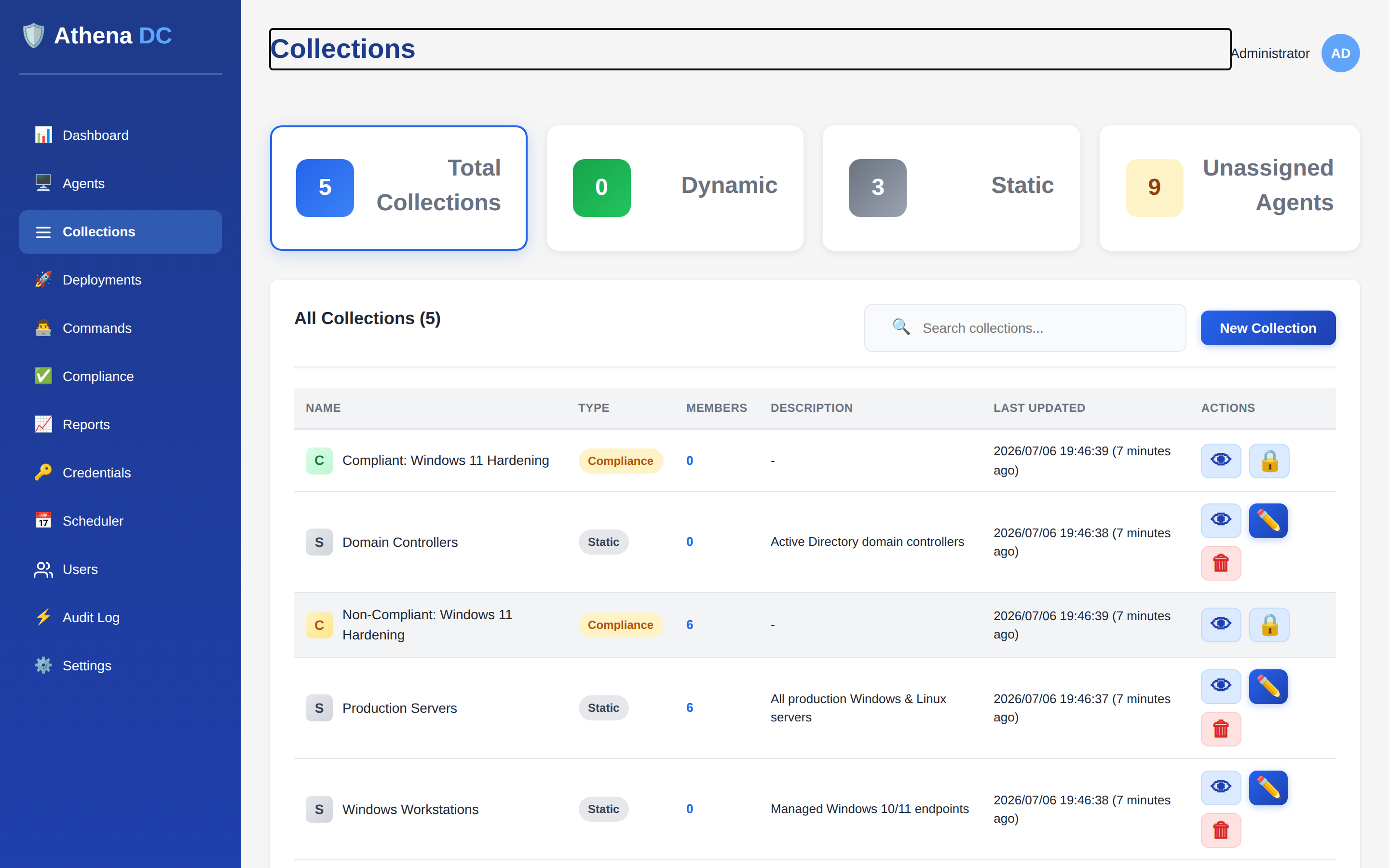
Static vs. dynamic#
Every collection declares a type:
| Type | Membership | Maintenance |
|---|---|---|
Static | An explicit list of agent IDs you assign. | You add and remove members by hand. |
Dynamic | Every agent that matches the collection's filter rules. | Membership is recomputed automatically — no manual edits. |
To "create a collection from metadata," create a Dynamic collection and describe the agents you want with one or more filters. Each filter tests an agent field (its metadata) against a value. Athena evaluates the filters against the fleet and keeps membership in sync as agents change.
Creating a collection#
Send a POST to api/Collections (an Operator or Admin token is
required). The request body has these fields:
| Field | Used by | Description |
|---|---|---|
name | both | Required. Display name for the collection. |
description | both | Optional free-text description. |
type | both | Static or Dynamic. |
memberIds | static | List of agent GUIDs to include. |
filters | dynamic | List of filter rules that define membership. |
Static collection#
POST /api/collections
{
  "name": "Production Servers",
  "description": "All production servers",
  "type": "Static",
  "memberIds": ["550e8400-e29b-41d4-a716-446655440000"]
}
Dynamic (metadata-based) collection#
For a metadata-based collection, set type to Dynamic and supply
filters. Each filter names a fieldPath (the agent field to read),
an operator, and a value to compare against:
POST /api/collections
{
  "name": "Windows Servers",
  "description": "All Windows Server machines",
  "type": "Dynamic",
  "filters": [
    {
      "fieldPath": "OperatingSystem.ProductName",
      "operator": "Contains",
      "value": "Windows Server"
    }
  ]
}
On success the API returns 201 Created with the new collection (including its
generated id and current memberCount).
Filter rules#
A dynamic collection holds a list of filters. Each filter is one
fieldPath · operator · value comparison, plus a
group that controls how the filters combine:
| Field | Description |
|---|---|
fieldPath | The agent field to read (see available fields). Supports dotted paths into nested objects, scan results, and custom metadata. |
operator | How to compare the field value against value (see operators below). |
value | The value to compare against. Compared case-insensitively; numbers and dates are parsed when both sides are numeric/date-like. |
group | All = every filter must match (AND); Any = at least one filter must match (OR). The group of the first filter decides the logic for the whole collection. |
Operators#
The supported operator values are:
| Operator | Matches when the field value… | Field types |
|---|---|---|
Equals | equals the value | String, Number, DateTime, Boolean |
NotEquals | does not equal the value | String, Number, DateTime, Boolean |
Contains | contains the value as a substring | String |
NotContains | does not contain the value | String |
StartsWith | starts with the value | String |
EndsWith | ends with the value | String |
GreaterThan | is greater than the value | Number, DateTime |
LessThan | is less than the value | Number, DateTime |
GreaterThanOrEqual | is greater than or equal to the value | Number, DateTime |
LessThanOrEqual | is less than or equal to the value | Number, DateTime |
Available fields#
Call GET api/Collections/fields to retrieve the full, live list of filterable
fields. The response includes Athena's predefined fields plus any fields discovered from
your PowerShell scan results. A selection of the predefined fields:
| Category | Field path | Type | Example |
|---|---|---|---|
| Agent | MachineName | String | SERVER01, WEB-SERVER-01 |
| Agent | OperatingSystem | String | Windows 11, Windows Server 2019 |
| Agent | IpAddress | String | 192.168.1.100 |
| Agent | Status | String | Online, Offline |
| Agent | AgentVersion | String | 1.1.0 |
| System Type | IsServer | Boolean | True / False |
| System Type | IsLaptop | Boolean | True / False |
| System Type | IsVirtualMachine | Boolean | True / False |
| System Type | IsDomainJoined | Boolean | True / False |
| System Type | ChassisType | String | Desktop, Laptop, Server |
| System Information | DomainName | String | CONTOSO, WORKGROUP |
| System Information | OSVersion | String | Microsoft Windows 11 Pro |
| Hardware | Manufacturer | String | Dell Inc., HP, Lenovo |
| Hardware | TotalMemoryMB | Number | 16384, 32768 |
| Security | TPMPresent | Boolean | True / False |
| Security | BitLockerStatus | String | Enabled, Disabled |
| Software | InstalledSoftware.Name | String | Google Chrome, 7-Zip |
| Services | Services.ServiceName | String | wuauserv, Spooler |
| Agent Status | IsStale | Boolean | True / False |
| Advanced | Metadata | String | Searches across all metadata fields |
If a fieldPath is not one of the built-in agent properties, Athena falls
back to the agent's metadata dictionary, so custom values reported by
your PowerShell collectors are filterable too. Fields from scan results use the
Scan.<scanDefinitionId>.<field> path form and appear in
GET api/Collections/fields once a scan has returned data.
Membership & refresh#
List the agents currently in a collection with
GET api/Collections/{id}/members. For a dynamic collection this returns the
agents matching the current filters; for a static collection it returns the assigned
members.
| Endpoint | Purpose |
|---|---|
GET api/Collections/{id}/members | List the member agents |
POST api/Collections/{id}/members | Add agents (static collections only) |
DELETE api/Collections/{id}/members | Remove agents (static collections only) |
POST api/Collections/{id}/refresh | Re-evaluate filters now (dynamic collections only) |
You cannot add or remove members on a dynamic collection by hand — update its
filters instead (via PUT api/Collections/{id}). Likewise,
refresh only applies to dynamic collections; static collections are managed
manually.
Dynamic collections are recomputed automatically as agents report in: when an agent
sends a heartbeat, Athena re-evaluates the dynamic collections affected by that agent and
updates membership immediately. Use POST api/Collections/{id}/refresh when
you want to force a full re-evaluation on demand (for example, right after changing the
filters).
PowerShell#
The Athena PowerShell module wraps the same API in New-AthenaCollection
(Operator or Admin role required):
# Static collection with initial members
$agentIds = (Get-AthenaAgent | Where-Object { $_.Tags -contains "prod" }).Id
New-AthenaCollection -Name "Production" -Type Static -MemberIds $agentIds

# Dynamic (metadata-based) collection of Windows Servers
$filter = [PSCustomObject]@{
    FieldPath = "OperatingSystem.ProductName"
    Operator  = "Contains"
    Value     = "Windows Server"
    Group     = "All"
}
New-AthenaCollection -Name "Windows Servers" -Type Dynamic -Filters @($filter)
Using a collection as a target#
Once a collection exists, use it as a reusable audience when rolling out software. See Software Deployment → Targeting for how deployments aim at agents by ID, tag, or collection.